Available Now - iOS & Android

Sim Racing Telemetry & AI Coach

Live telemetry, AI corner coaching, and lap-by-lap analysis for Gran Turismo 7 and Assetto Corsa - streaming directly to your phone over your home network.

Getting started just got faster. A built-in selection of GT7 circuits needs no setup - load in, drive, and see full lap analysis immediately. New circuits join the library with every update.

2-month free trial Then €5.99/month Cancel anytime No account required
Delta vs Best
-0.312
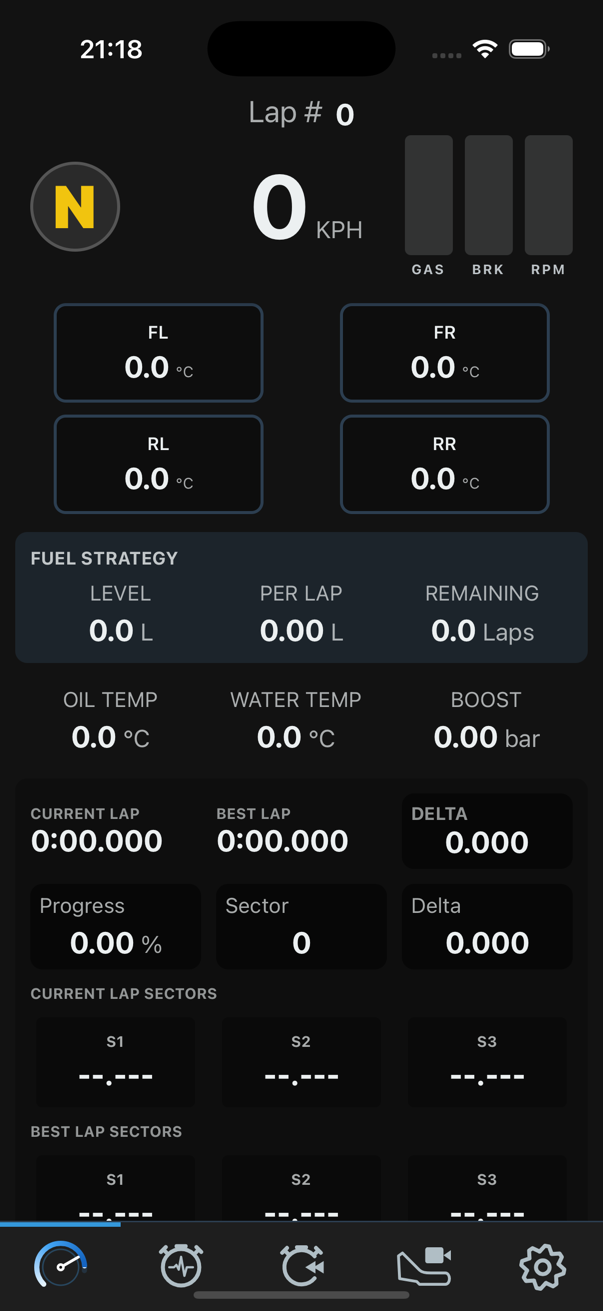
Driver Apex live telemetry dashboard showing GT7 tire temperatures, speed, and lap delta on iPhone
Current Lap
1:52.847

Two Games.
One App.

Connect to your PlayStation via Wi-Fi and start capturing telemetry in seconds. No mods, no cables, no PC required.

PlayStation 4 & 5 — Time Trial

Gran Turismo 7

Full telemetry via UDP broadcast. AI coach analyses every corner of every lap. Drive in the centre of the track for two full laps - any speed works - and the app auto-detects your layout. When you change circuit in Time Trial, tap Restart Session in the app and drive two laps again to re-detect (GT7 does not broadcast the circuit name in its telemetry).

Live Telemetry Predictive Analysis Corner Coach Auto Track Detection
PlayStation 4 & 5 — Time Trial or Hotlap

Assetto Corsa

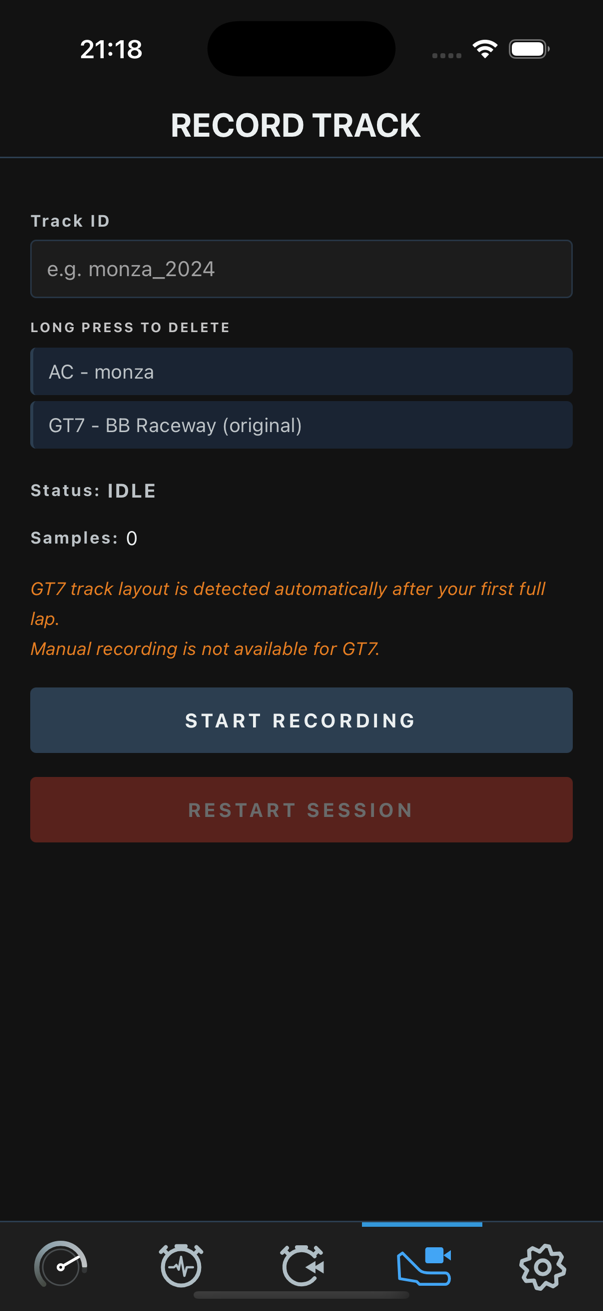
Full UDP telemetry via handshake on PS4/PS5. Track name is read directly from the telemetry session. Tap Record Track in the app after loading your session and before starting the lap to capture the layout. Captures sector splits, tire data, and fuel strategy.

Live Telemetry Predictive Analysis Corner Coach Auto Track Name

Everything a Driver
Needs to Improve.

Six tools, one app, completely offline. Your data never leaves your phone.

Live Telemetry Dashboard

Speed, ABS/TC status, throttle, brake, clutch, RPM, gear, current lap, best lap, and delta - live on both games. Tyre temps, fuel, oil, water, and boost require GT7.

GT7 & AC - core data GT7 - tyre temps, fuel, oil, boost

On-Device AI Coach (Experimental)

A 770 MB language model runs entirely on your phone - no cloud, no internet. After each full lap it produces critical, moderate, and minor coaching notes per corner. Analysis speed varies by device and may take a minute on older hardware.

GT7 & AC Experimental

Lap History

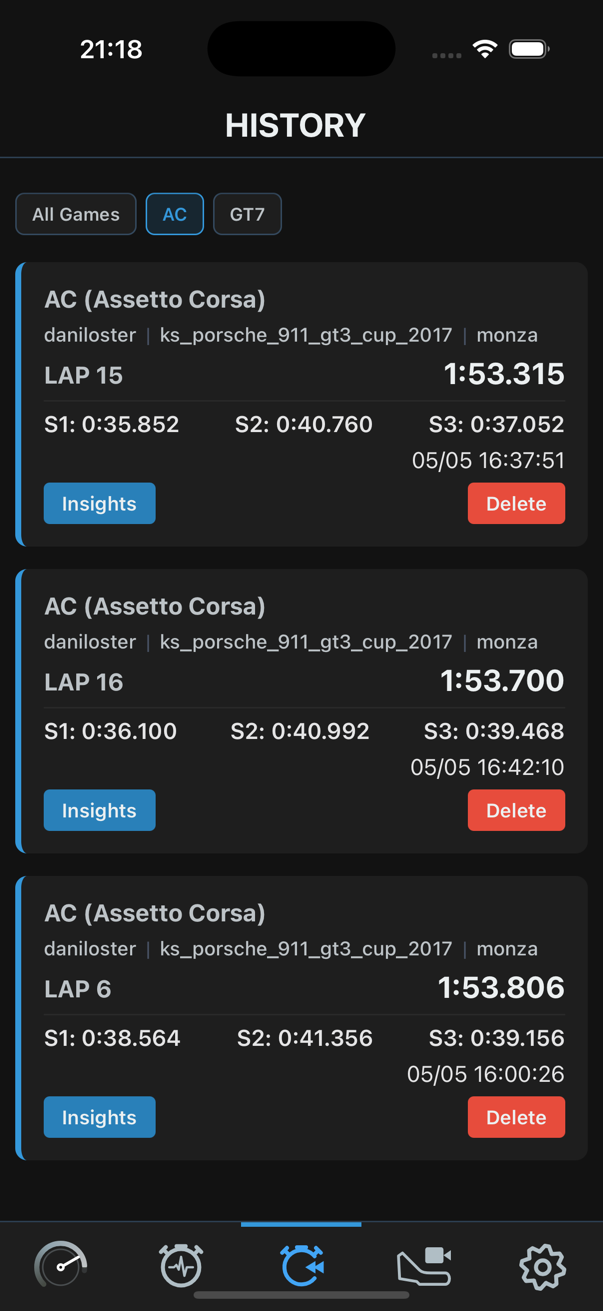
The last 10 laps per game, driver, car and track combination saved with full sector splits, timestamps, and metadata. Filter by game or sort by lap time. Tap any lap to review coaching insights.

GT7 & AC

Track Detection

GT7 auto-detects layout after two full laps driven in the centre of the track - slow speed is fine. When you change circuit in Time Trial, tap Restart Session in the app and drive two laps again to re-detect (GT7 does not send the circuit name in telemetry). For AC, tap Record Track in the app after loading your session and before starting the lap - the track name arrives automatically from the telemetry handshake. If you have not recorded the track before, drive one full lap in the centre so the app can map it.

GT7 & AC - different methods

Fuel Strategy

Fuel level, per-lap consumption, and estimated laps remaining - all live. GT7 exposes this data natively. Not available on AC as the game does not broadcast fuel data over UDP.

GT7 only

Predictive Turn Analysis

Turn-by-turn coaching as you drive - no model download needed. Each corner is analysed in a rolling window and feedback appears immediately after you exit it.

GT7 & AC

What Each Game Provides.

Features depend on what each game broadcasts over UDP. GT7 exposes a richer telemetry package than AC on PlayStation.

Feature GT7 AC
Driving inputs
Speed (km/h)
Throttle / Brake / Clutch
Gear + Engine RPM
Steering angle
ABS / TC status (enabled + in action)
Lap & session data
Current lap time / best lap / delta
Sector splits (S1, S2, S3)
Car position on track (0-100%)
3D world coordinates (track map)
Car in pit detection
Suggested gear indicator
Tyres
Suspension height (all 4 corners)
Wheel slip ratio & slip angle
Tyre surface temperature (FL/FR/RL/RR)
Tyre pressure
Tyre surface type (asphalt, grass, dirt)
Car health & powertrain
Fuel level & fuel capacity
Oil temperature
Water temperature
Boost / turbo pressure
Rev limiter & rev light active
G-forces (lateral, longitudinal, vertical)
Analysis & coaching
Predictive turn-by-turn analysis
AI Coach per-corner insights (experimental)
Fuel strategy calculator

Not all data fields are implemented yet. As the community grows and driver feedback comes in, support for additional telemetry channels and new game integrations will be added in future updates.

Corner-by-Corner
Coaching, Powered
by On-Device AI.

After each complete lap, the app runs a full AI analysis on your telemetry - entirely on your device, with no data ever sent to the cloud. Coaching notes are generated per corner with critical, moderate, and minor severity levels.

AI Coach is an experimental feature. When you enable it, you still get instant turn-by-turn feedback — predictive analysis is always on. Once you complete a turn on a recognized track, AI Coach works in the background and delivers richer per-corner insights as soon as it finishes. Processing time varies by device: more powerful phones complete analysis faster, while older or lower-powered devices may need a minute or more per turn.

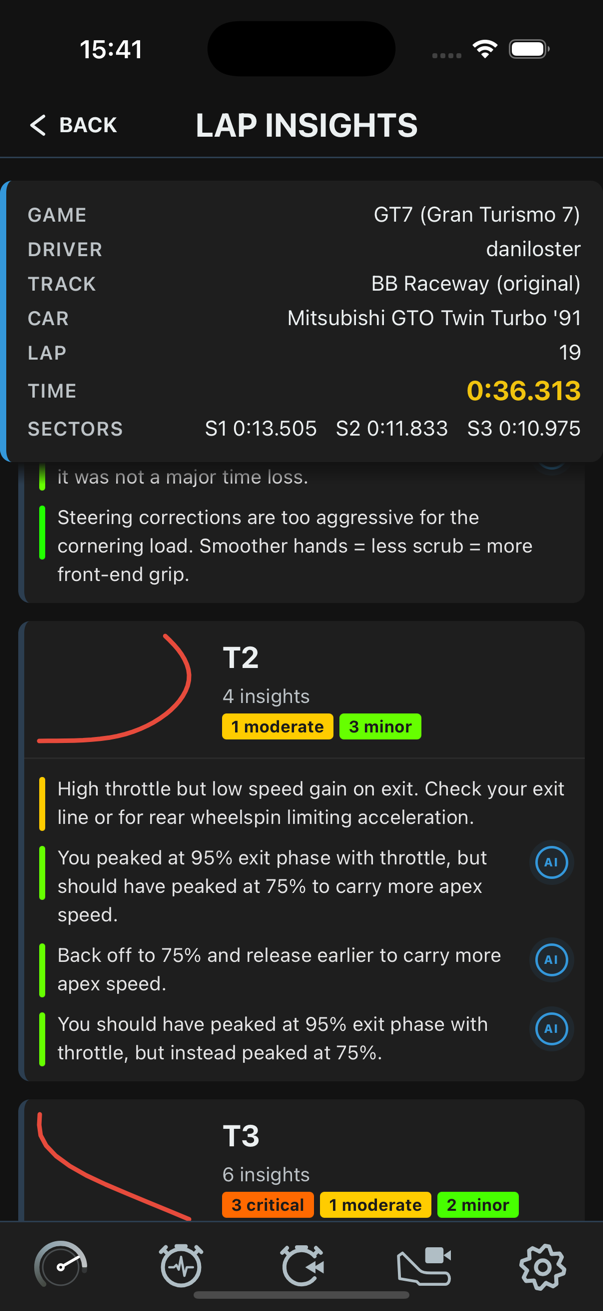
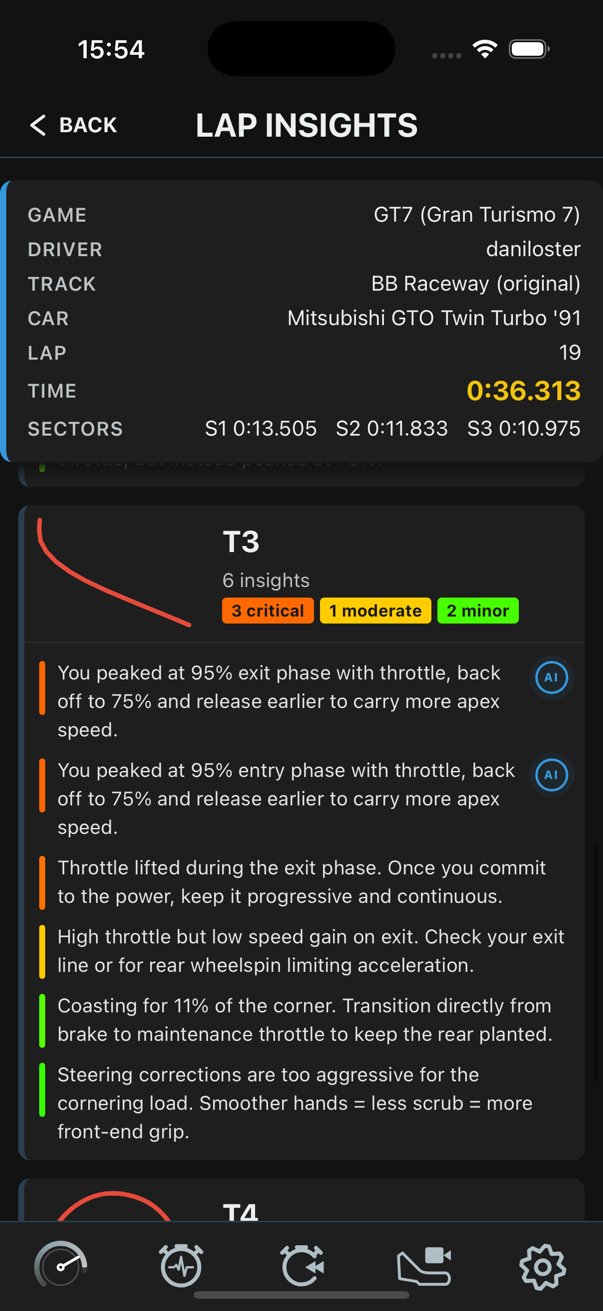
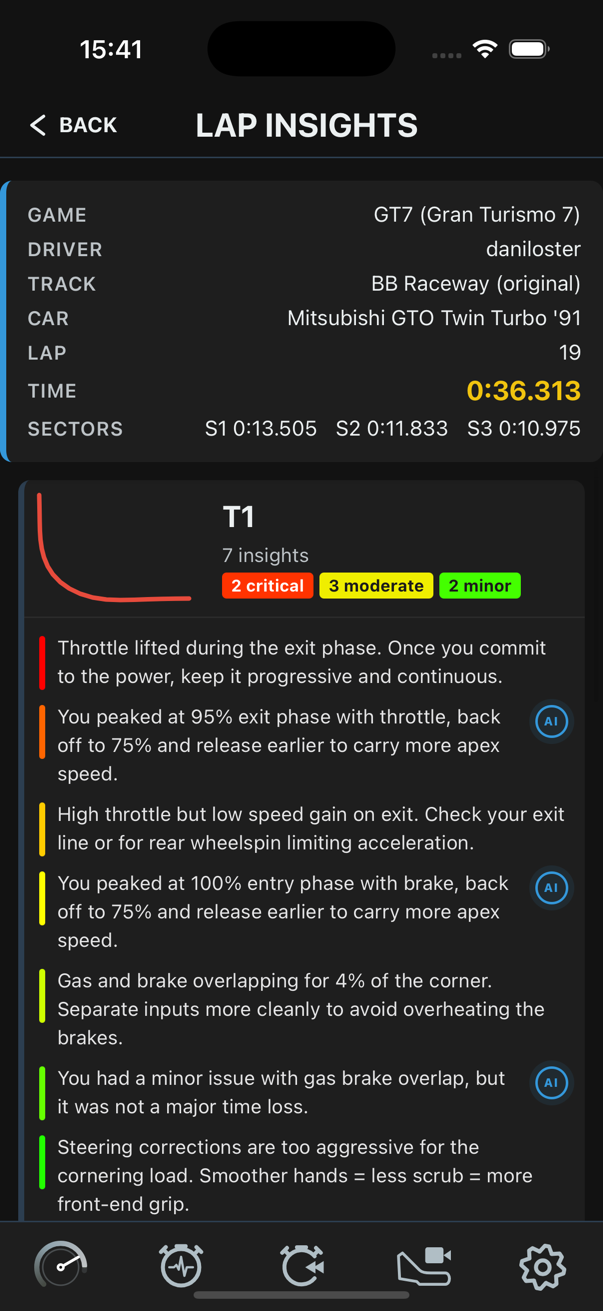
T1 - Throttle exit: You peaked at 95% exit phase with throttle. Back off to 75% and release earlier to carry more apex speed. AI

T2 - Brake entry: High throttle but low speed gain on exit. Check your exit line or rear wheelspin limiting acceleration.

T3 - Steering: Corrections are too aggressive for the cornering load. Smoother hands = less scrub = more front-end grip.

AI coach insights for T1 corner
AI coach insights for T2 and T3 corners
AI coach insights for T3 and T4 corners
Live telemetry dashboard showing tire temps, speed and lap times

Everything
On One Screen.

The live dashboard streams your car's full telemetry package at up to 60 Hz. All four tire temperatures, fuel burn, oil and water, boost pressure, sector splits with personal best comparison, and a scrolling delta gauge - visible at a glance.

Speed
247 km/h
Delta
+0.312
Fuel Left
18.4 L
FL Tyre
84°C
FR Tyre
86°C
Boost
0.8 bar

Three Steps
to Race Faster.

No hardware, no mods, no subscriptions to anything else. Just your PlayStation, your Wi-Fi, and your phone.

01

Connect

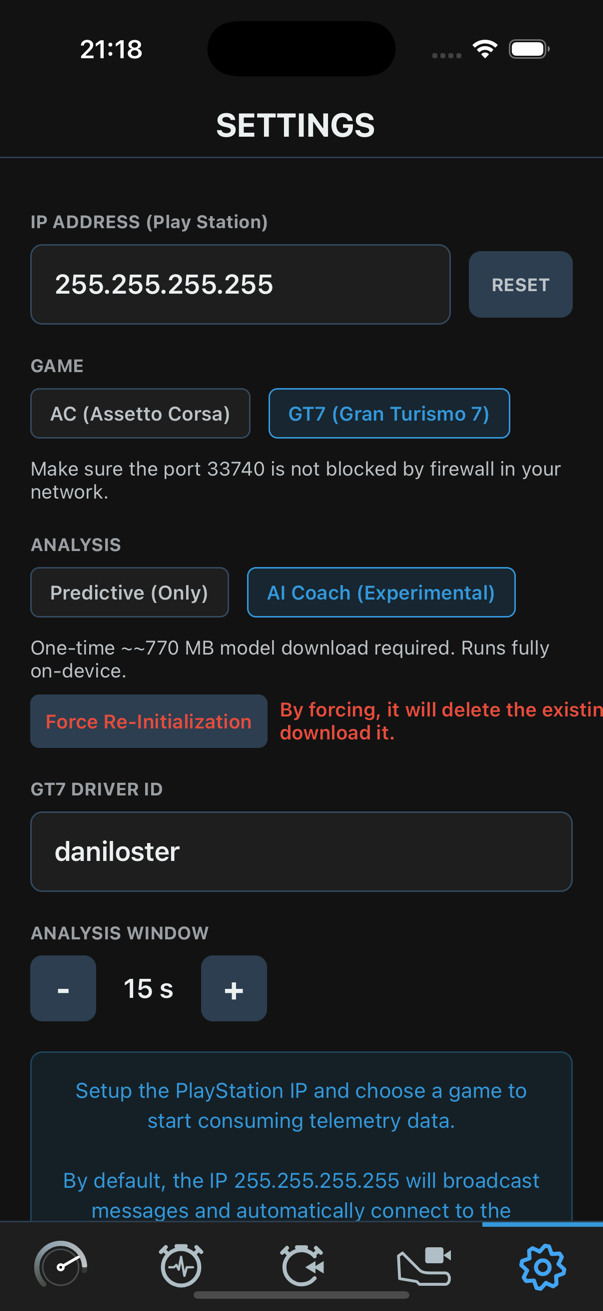
Open Settings, select your game, and enter your PlayStation IP address. Leave it as 255.255.255.255 to use broadcast mode - it auto-connects to either game on the same Wi-Fi. Make sure your router is not blocking the required UDP ports (GT7: 33740 & 33739 - AC: 9996).

02

Race

Start a Time Trial session in GT7, or a Time Trial or Hotlap session in AC. The app immediately starts receiving telemetry. GT7: drive in the centre of the track for two full laps at any speed - the layout auto-detects from position data. If you change circuit, tap Restart Session in the app and drive two laps again to re-detect (GT7 does not broadcast circuit names). AC: tap Record Track in the app after loading your session and before starting the lap - the track name arrives automatically from the telemetry handshake. If you have not recorded the track before, drive one full lap in the centre so the app can map it.

03

Analyse

Review your lap history and compare sector times. Predictive mode delivers instant turn-by-turn feedback as you drive. AI Coach (experimental) generates deeper per-corner insights after each complete lap - fully offline, on your device.

Real Data.
Real Improvements.

AI Insights after a Lap

After each complete lap, AI Coach (experimental) analyses every corner and surfaces coaching notes - critical, moderate, and minor. Speed depends on your device.

GT7 Live Session

Real-time track map view with telemetry overlay and live sector delta - showing current vs personal best lap split by split.

One Plan.
No Surprises.

Start free. Stay only if it makes you faster. Cancel anytime from the App Store or Google Play.

Premium Access

Driver Apex Companion

5.99 / month

Ireland price — other regions vary by VAT & currency.

2 months completely free - no charge until trial ends
  • Live telemetry at up to 60 Hz (speed, tires, fuel, delta, sectors)
  • Predictive turn-by-turn analysis - instant corner feedback as you drive, no download needed
  • Last 10 laps per game, driver, car and track combination - with sector splits and metadata
  • Supports Gran Turismo 7 and Assetto Corsa on PlayStation 4 & 5
  • Auto track detection (GT7: one full lap - AC: handshake from telemetry)
  • Experimental AI Coach - deep per-corner insights after each lap, fully offline
  • Fuel strategy calculator - level, per-lap, laps remaining
  • All future updates included - no hidden upgrades

Have questions? Reach us at support@driverapex.com

Common Questions.

Gran Turismo 7 (Time Trial mode) and Assetto Corsa (Time Trial or Hotlap mode), both on PlayStation 4 and PlayStation 5. Both games broadcast telemetry via UDP over your home Wi-Fi network. Support for additional titles may be added in future updates.
No. After the initial app download and AI model download (~770 MB, one-time), everything runs entirely on your local network and on-device. Your telemetry data never leaves your home.
This is an experimental feature. After each complete lap, the app segments your telemetry by corner and passes it to an on-device language model (~770 MB, downloaded once). The model generates coaching notes - critical, moderate, or minor - covering throttle, braking, steering, and fuel for each corner. Analysis speed depends on your device; older phones may take a minute or more. No data is ever sent to an external server.
The AI model (~770 MB) is downloaded once when you first enable AI Coach mode in Settings. You can use the Predictive analysis mode without downloading it. The download only happens over Wi-Fi and can be triggered or re-triggered from the Settings screen.
GT7 broadcasts telemetry automatically - no in-game settings change is needed. Use Time Trial mode. Leave the IP in the app as 255.255.255.255 for broadcast (works for both GT7 and AC). Both devices must be on the same Wi-Fi. Make sure your router allows UDP on ports 33740 and 33739 (GT7) or 9996 (AC). For track detection, drive in the centre of the track for two full laps - any speed. When you switch circuit in Time Trial, tap Restart Session in the app and drive two more laps to re-detect (GT7 telemetry does not include the circuit name).
After 2 months, the app will ask you to start a subscription to continue. Your saved lap history and recorded tracks are never deleted. If you re-subscribe later, everything is exactly where you left it. You can cancel anytime from your App Store or Google Play subscription settings.
Yes. Tap "Restore Purchases" in the Settings screen. The app connects to your App Store or Google Play account and restores any active subscription tied to that account. No account or login within the app is required.

Got a Question?
I'm Here.

Driver Apex Companion is built solo, for sim racers. If something breaks, feels wrong, or you have an idea for a feature - I want to hear it. Expect a personal reply.